
Many times in my edit review screenings, I’ve had a need to pull up a timecode display quickly and easily in Final Cut Pro, so the producer can see where we are and make notes about the cut with at least rough TC. But unlike Avid editors who are used to being able to easily add timecode burn-in to their window in realtime, FCP’s Timecode Generator (or Reader) filter — while billed as “realtime preview” — is usually anything but, especially if you have any sort of filters or multiple layers in your project.
You don’t have the time to sit there and render out the Timecode Generator filter. So what do you do? Disappoint your producer? Play it out through an HDCAM deck?
No. What you do is go grab ARTIS Screen Loupe.
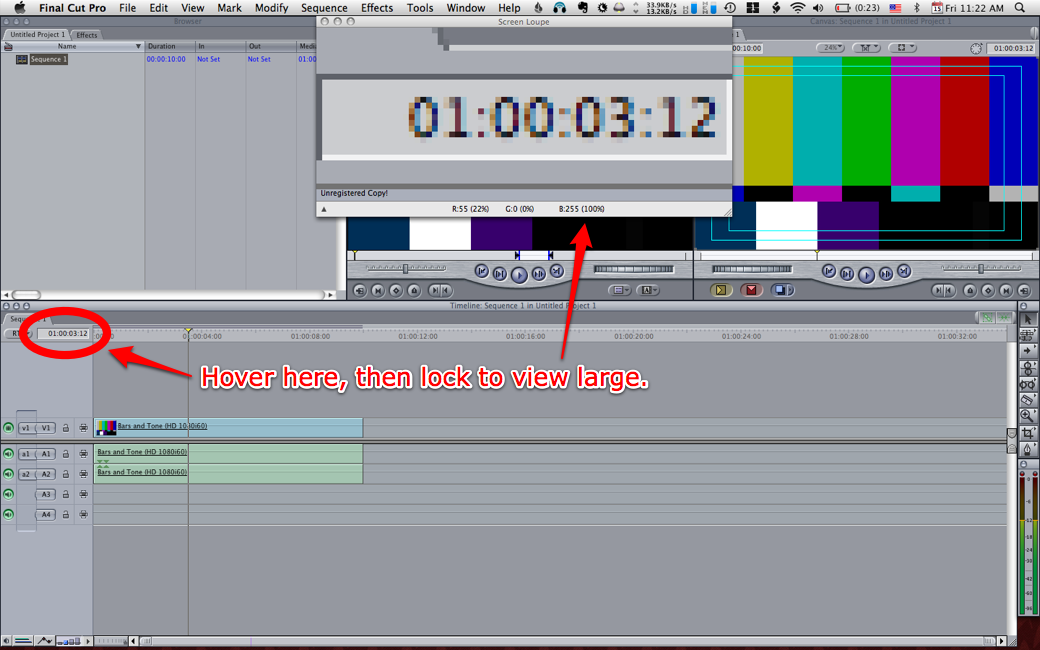
Screen Loupe is a simple tool that magnifies part of your screen. But unlike several other tools that purport to do the same thing, this one has a difference that’s critically important for our purpose: it updates the magnified image several times per second.
Warning
Lost some text here when migrating blog hosts, but it’s probably something like “You might want to check out Xscope, which has screen magnification plus several other pixel-precise measuring tools…”
[…]xScope (originally co-developed by ARTIS), so if you’re doing other design work, you might want to check out that handy multi-tool before you pay just for Screen Loupe.
Of course, Final Cut Pro 7 may finally come out in a month or two and make this tip obsolete, but in meantime it’s the best way to get a readable TC window up on the screen when you need it fast.